IPTV Smarters Pro is a popular app for streaming live TV, movies, and series on Firestick devices, but how to download IPTV Smarters Pro on Firestick can be confusing since the app isn’t available on the Amazon App Store. This guide will walk you through the updated 2026 steps tailored for Firestick users, covering installation, setup, troubleshooting, and security tips.
IPTV Smarters Pro’s absence from the Amazon App Store stems from the platform’s strict policies around IPTV services and content rights. Most IPTV apps don’t meet Amazon’s requirements or enter license agreements, so they must be sideloaded instead. This means manually installing the APK (Android Package Kit) file rather than downloading it through the usual app store.
Before you start the installation, there are a couple of prerequisite steps on your Firestick. First, you must enable the installation of apps from unknown sources since IPTV Smarters Pro is not officially recognized by Amazon. To do this, go to the Firestick Settings, select “My Fire TV,” then “Developer Options,” and toggle on “Apps from Unknown Sources.” This unlocks the ability to sideload third-party apps safely.
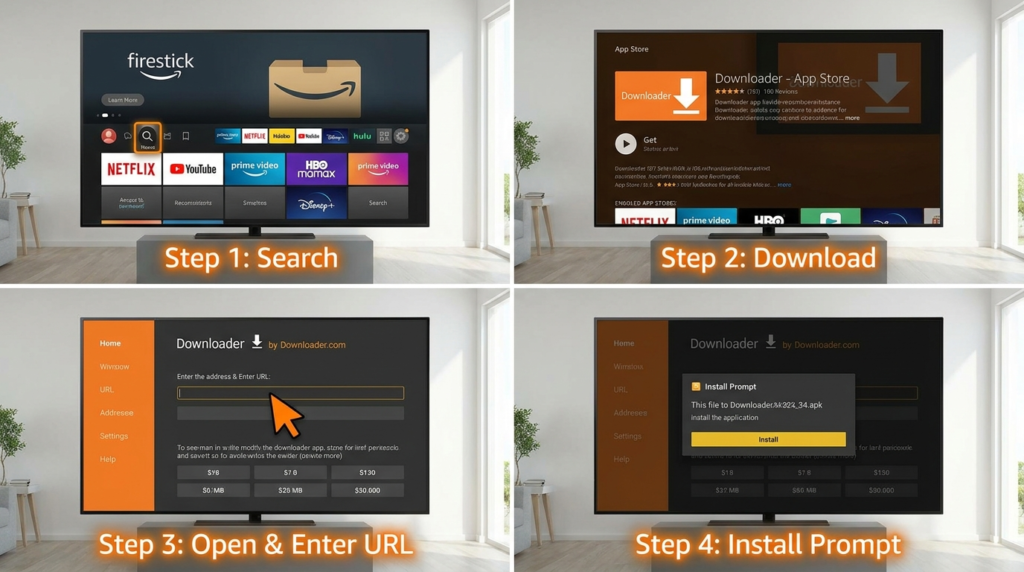
Next, you need to install the Downloader app from the Amazon App Store. Downloader is a simple tool that allows you to download APK files directly onto your Firestick. To find it, use the search function on your Firestick home screen, type “Downloader,” and install it. This app streamlines accessing IPTV Smarters Pro’s APK, making sideloading manageable even for beginners.
The actual download and installation involve using the Downloader app to input the APK URL. Open Downloader, type the IPTV Smarters Pro APK link into the URL field—such as the one provided on reputable sites—and download the file. When prompted, install the app on your Firestick. If you encounter errors during this process, common fixes include checking your internet connection, ensuring sufficient storage on your Firestick, and confirming the APK source is legitimate. For detailed troubleshooting, solutions are available on forums like JustAnswer’s guide specifically addressing IPTV Smarters URL issues on Firestick (JustAnswer IPTV Smarters troubleshooting).
Once installed, setting up IPTV Smarters Pro requires logging in with your IPTV provider’s Xtream Codes or API credentials. These details authenticate your subscription, unlocking access to live channels and on-demand content. In the app settings, you can configure streaming preferences, EPG (Electronic Program Guide) layouts, and VOD (Video on Demand) options to tailor your viewing experience.
To enhance protection while streaming IPTV, using a VPN (Virtual Private Network) is highly recommended. VPNs encrypt your internet traffic, masking your IP address and securing data transmissions. This reduces risks related to ISP throttling and unauthorized tracking. Included in many premium IPTV packages are suggestions for compatible VPN services to ensure both privacy and uninterrupted streaming.
Frequently asked questions shed light on common concerns. IPTV Smarters Pro cannot be installed directly from the Amazon App Store; sideloading is necessary. When Downloader isn’t working, restarting the Firestick or reinstalling the app often resolves the issue. Enabling unknown sources remains essential for this entire process, found in Developer Options under Firestick settings. The app is generally safe if downloaded from trusted sources, and troubleshooting channel loading might involve resetting login credentials or checking your internet connection.
For those wanting additional guidance on IPTV setup, the comprehensive step-by-step methods outlined on the How Do You Get IPTV Step Guide & Setup page provide great context on optimizing your IPTV experience. Pricing and plan comparisons on Best IPTV Provider Pricing can help you evaluate which subscription aligns best with your viewing habits.
If you want a safe and efficient IPTV experience, knowing how to download IPTV Smarters Pro on Firestick is crucial. This method gives you access to a broad range of channels and content while maintaining control over your app sources. For more information about streaming capabilities of IPTV Smarters Pro and access to the APK, resources like TroyPoint’s detailed APK overview (TroyPoint IPTV Smarters Pro APK) can be very helpful.
Ultimately, combining these installation steps with secure streaming habits, including VPN usage, creates a premium viewing environment on your Firestick. To explore the best IPTV plans and keep your streaming versatile and secure, visit Best IPTV Provider and start enhancing your TV experience today.